What Is Zanussi Oven PlusSteam Function?
Issue
- What Is Zanussi Oven PlusSteam Function?
Applies to
- Zanussi Freestanding cooker
- Zanussi Built-in Single Oven
Resolution

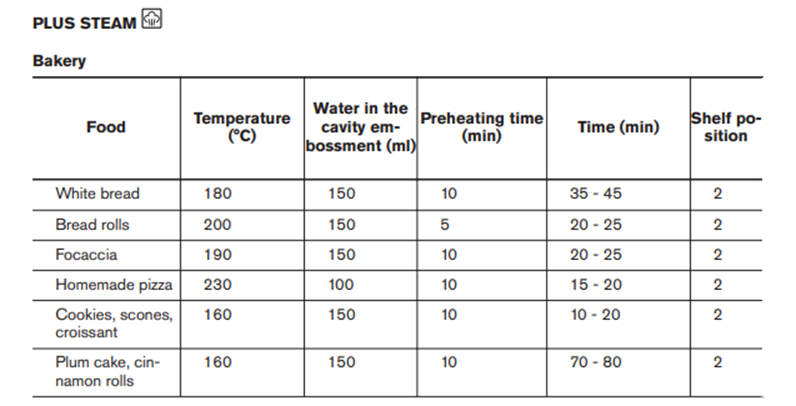
PlusSteam is perfect for achieving great bakes, whether you’re baking breads or making Yorkshire puddings or delicious cakes. Bread will be fluffy on the inside and have a crispy and golden crust on the outside while cakes will be moist and tasty. By adding the right amount of steam at the beginning of the baking process, the colour is made more golden and the crust crispier.
How to use PlusSteam
Step 1. Pour 250ml of water into the reservoir in the bottom of the oven cavity.

Step 3. Set the required temperature and leave for 10 minutes before putting the food in the oven.
Step 4. Wipe away any residual moisture after the oven has cooled.

If you found this information helpful, please give us a thumbs up below. If this information did not resolve your question, all constructive feedback is welcome
Was this article helpful?
Related Articles
- After a power cut how to set the ovens time - Zanussi
- How to Proof Dough in an Oven (Without a Proofing Setting)
- Oven light does not work
- The oven door cannot be opened after pyrolytic cleaning
- Oven cooling fan runs all the time
- After a short power failure, Demo appears in the display and my oven will not heat up - Zanussi
- Oven Trips Fuses or Circuit Breaker – Causes & How to Fix
- Oven clock time changes
- The time is not shown on the display when the oven is turned off
- Oven displays error code with prefix F
Related Articles
- After a power cut how to set the ovens time - Zanussi
- How to Proof Dough in an Oven (Without a Proofing Setting)
- Oven light does not work
- The oven door cannot be opened after pyrolytic cleaning
- Oven cooling fan runs all the time
- After a short power failure, Demo appears in the display and my oven will not heat up - Zanussi
- Oven Trips Fuses or Circuit Breaker – Causes & How to Fix
- Oven clock time changes
- The time is not shown on the display when the oven is turned off
- Oven displays error code with prefix F