Dishwasher displays error code i50
Issue
- Dishwasher displays one of the following error codes: i50, i51, i52, i53, i54, i55, i56, i57, i58, i59, i5A, i5B (i5H), i5C, i5D, i5E, i5F
- My dishwasher is showing an error code and not washing
Applies to
- integrated dishwasher
- freestanding dishwasher
Resolution
1. Reset your dishwasher.
Turn off the appliance from the mains supply, wait around 1 minute and then switch it back on at the mains supply.
2. Check your dishwasher filter and sump (see below) for signs of foam/suds & debris
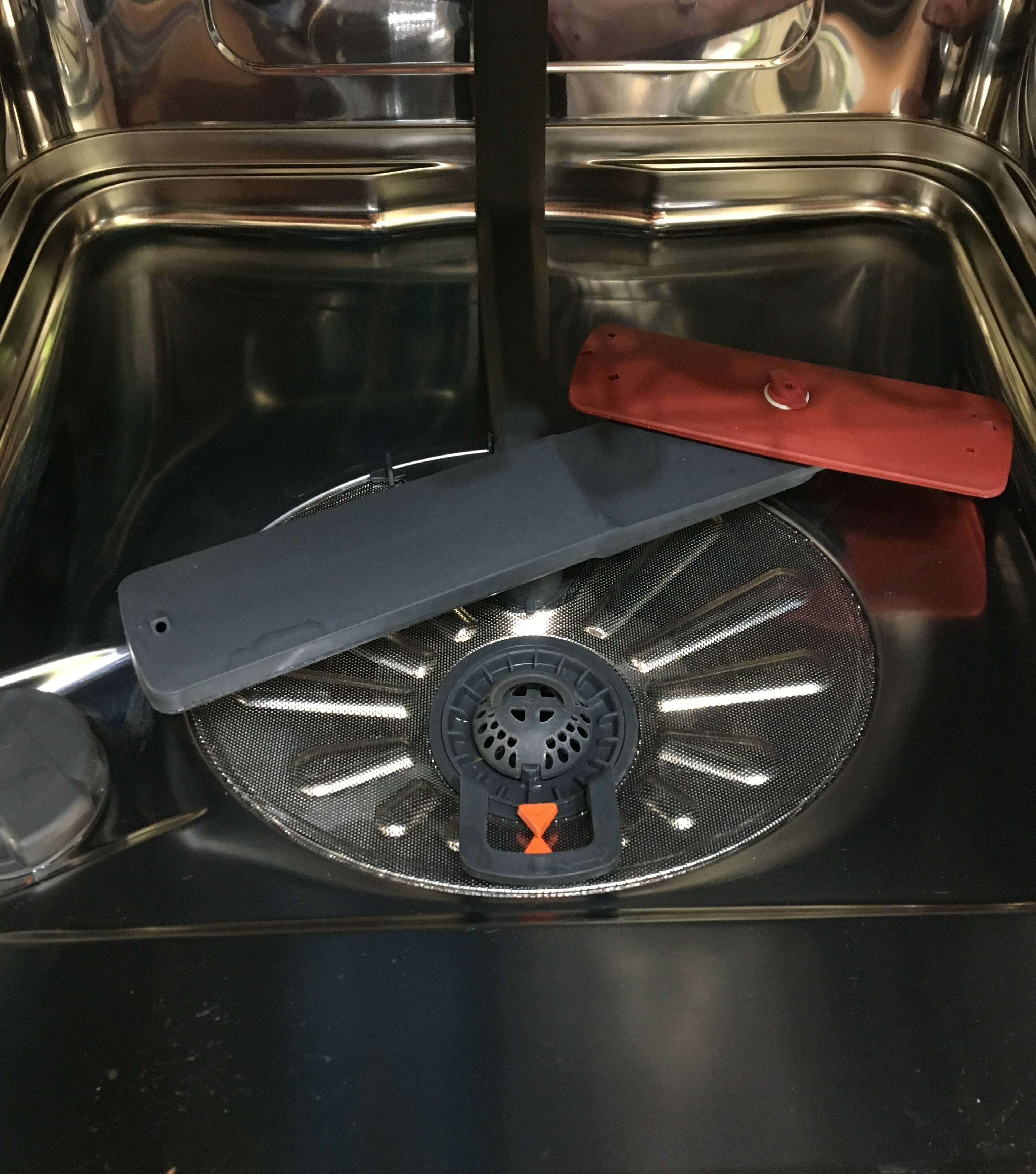
- Make sure you clean all the filters
- Clear any foam/suds from the sump
- Turn on the dishwasher, select a suitable cycle and start it.
- If the cycle starts and operates normally, the problem has been resolved.
See the instructional video
Book a Service Visit
If none of the above steps resolve the issue, we recommend booking a service visit with an authorised technician. A professional inspection will help identify and fix any internal faults safely and efficiently.
Cause
- All i50 family error codes relate to a wash motor/pump malfunction
Was this article helpful?
Related Articles
- Dishwasher displays error code i40, i43 or i44
- Program not starting and cycle indicator light flashing on dishwasher
- Dishwasher is not heating up water
- Dishwasher does not / will not start but the power is on
- Dishwasher does not switch on, no light on the control panel
- Dishwasher displays error code i20, beeps twice, not draining
- The auto-cleaning indicator ("Machine Care") lights up on the dishwasher
- Dishwasher installation (Sliding door)
- How does the AirDry function in AEG dishwashers work?
- How to deactivate AirDry function on Zanussi dishwasher
Spare parts & Accessories
Find original spare parts and accessories for your appliance in our webshop and have them delivered directly to your door.
Related Articles
- Dishwasher displays error code i40, i43 or i44
- Program not starting and cycle indicator light flashing on dishwasher
- Dishwasher is not heating up water
- Dishwasher does not / will not start but the power is on
- Dishwasher does not switch on, no light on the control panel
- Dishwasher displays error code i20, beeps twice, not draining
- The auto-cleaning indicator ("Machine Care") lights up on the dishwasher
- Dishwasher installation (Sliding door)
- How does the AirDry function in AEG dishwashers work?
- How to deactivate AirDry function on Zanussi dishwasher