Zanussi oven displays LOC, SAFE or padlock symbol
Issue
- The oven displays SAFE or padlock symbol. It indicates that the safety lock is activated
- How to disable the Child Lock in Zanussi oven?
Applies to
- Zanussi Integrated oven
- Zanussi Freestanding cooker
Resolution
If your oven displays SAFE or a PADLOCK symbol:
- CHILD LOCK is activated
- PYROLYTIC CLEANING is running (when the oven cools down to a safe temperature the door will automatically unlock)
- FUNCTION LOCK is activated
Refer to the description in the user manual, as the methods for disabling the lock vary depending on the model.
The activation and deactivation procedure is described in the "Additional Functions" chapter.
Download the user manual for your oven.
The availability of functions depends on the appliance model.
User Interface No.1

CHILD LOCK
When the Child Lock is on, the oven cannot be turned on accidentally
1. Ensure the knob for the heating functions is in the OFF position
2. Press  at the same time for 3 seconds
3. The signal sounds. SAFE appears on the display
4. The door is locked
To turn off the Child Lock, repeat step 2
PYROLYTIC CLEANING

FUNCTION LOCK
You can turn on the Function Lock function only when the oven is switched on.
When the Function lock is on the temperature and time settings cannot be changed accidentally.
1. Select an oven function and set it according to your preferences.
2. Press at the same time for 3 seconds
3. The signal sounds.
4. "Loc" appears on display for 5 seconds and will also appear on the display when you turn the knob for the temperature or press any button when the Function Lock is on.
When you turn the knob for the oven functions, the oven stops.
When you turn off the oven while the Function Lock is on, the Function Lock switches automatically to the Child Lock.
Refer to Child Lock above for information.
User Interface No.2
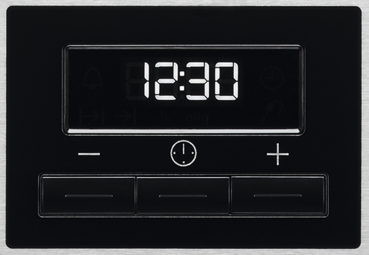
CHILD LOCK
When the Child Lock is on the oven cannot be turned on accidentally.
1. Ensure the knob for the oven functions is in the off position.
2. Press at the same time for 3 seconds

3. The signal sounds.
4. SAFE and appear on display.
5. The door is locked.
To turn off the Child Lock, repeat step 2
Was this article helpful?
Related Articles
- The oven door cannot be opened after pyrolytic cleaning
- After a power cut how to set the ovens time - Zanussi
- How to Proof Dough in an Oven (Without a Proofing Setting)
- Oven light does not work
- Oven cooling fan runs all the time
- After a short power failure, Demo appears in the display and my oven will not heat up - Zanussi
- Oven Trips Fuses or Circuit Breaker – Causes & How to Fix
- Oven clock time changes
- The time is not shown on the display when the oven is turned off
- Oven displays error code with prefix F
Related Articles
- The oven door cannot be opened after pyrolytic cleaning
- After a power cut how to set the ovens time - Zanussi
- How to Proof Dough in an Oven (Without a Proofing Setting)
- Oven light does not work
- Oven cooling fan runs all the time
- After a short power failure, Demo appears in the display and my oven will not heat up - Zanussi
- Oven Trips Fuses or Circuit Breaker – Causes & How to Fix
- Oven clock time changes
- The time is not shown on the display when the oven is turned off
- Oven displays error code with prefix F