Oven displays error message F11 / F111
Issue
- Oven displays error message F11 / F111 / F129
- Food probe not working
Applies to
- Integrated oven
Resolution
The F111 error code on an oven usually indicates that the food probe (roasting thermometer) is faulty or not connected correctly.
This error may also appear as F11 or F129 on some models.
How to fix F11 error code
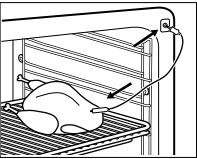
- Check the food probe connection
- Remove and reconnect the roasting thermometer.
- Ensure the plug is fully inserted into the oven's probe socket.
- Inspect the probe
- Check for damaged wires, bent contacts, or visible signs of wear.
- If the probe is damaged, it should be replaced.
- You can buy a new one from our Webshop.
- Reset the oven
- Switch the oven off at the mains for about 30 seconds and then switch it back on.
- Contact service if the error remains
- If the error continues after reconnecting or replacing the probe, the probe socket, wiring, or electronic control system may require inspection by an authorized technician.
If the above advice does not resolve the problem, we recommend requesting a visit by a service engineer.
Was this article helpful?
Related Articles
- The oven door cannot be opened after pyrolytic cleaning
- After a power cut how to set the ovens time - Zanussi
- How to Proof Dough in an Oven (Without a Proofing Setting)
- Oven light does not work
- Oven cooling fan runs all the time
- After a short power failure, Demo appears in the display and my oven will not heat up - Zanussi
- Oven Trips Fuses or Circuit Breaker – Causes & How to Fix
- Oven clock time changes
- The time is not shown on the display when the oven is turned off
- Oven displays error code with prefix F
Spare parts & Accessories
Find original spare parts and accessories for your appliance in our webshop and have them delivered directly to your door.
Related Articles
- The oven door cannot be opened after pyrolytic cleaning
- After a power cut how to set the ovens time - Zanussi
- How to Proof Dough in an Oven (Without a Proofing Setting)
- Oven light does not work
- Oven cooling fan runs all the time
- After a short power failure, Demo appears in the display and my oven will not heat up - Zanussi
- Oven Trips Fuses or Circuit Breaker – Causes & How to Fix
- Oven clock time changes
- The time is not shown on the display when the oven is turned off
- Oven displays error code with prefix F