Oven - How to replace the top and side lamp
Resolution

Refer always to your product’s user manual safety information before any repair or maintenance operation. https://www.electrolux.com/support/user-manuals/

WARNING! RISK OF ELECTRIC SHOCK
Before any repair or maintenance operation, deactivate the appliance and disconnect the mains plug from the socket.
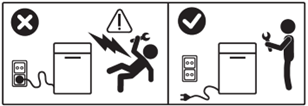
WARNING! RISK OF INJURY

Always take care when moving appliances. For heavy appliances it's safest for two persons to move it. Always use safety gloves and safety footwear. Wear safety gloves at all times to protect from cuts from sharp edges.
WARNING! RISK OF EYE INJURY

Wear safety glasses if you perform maintenance or repair work involving springs.
WARNING! RISK OF BURNS
Before any repair or maintenance operation make sure the appliance is not hot.

WARNING! CHOKING HAZARD
Small parts not for children under 3 years. Keep all small parts and packaging out of reach of children.
Only adults should use or install the product.
Make sure to use the product only for its designated purpose and verify that it is a compatible part for the intended product.
Do not use or install the product if damaged.
Please note that self-repair or nonprofessional repair can have safety consequences if not done properly and might void the warranty. Possessing the necessary know-how is essential.
How to replace the top and side oven lamp
We recommend to follow lamp replacement steps in the oven’s user manual.
The top lamp
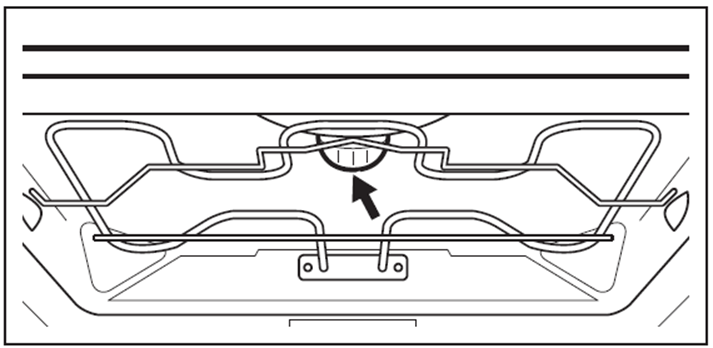
- Turn the lamp glass cover counterclockwise to remove it.
- Clean the glass cover.
- Replace the lamp with a suitable 300°C heat-resistant lamp.
- Install the glass cover.
The side lamp
- Remove the left shelf support to get access to the lamp.
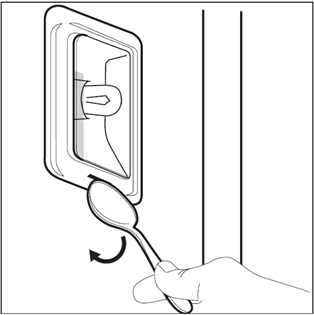
- If it’s a cover fixed with screws, use a TORX 20 screwdriver to remove the cover. If it does not have screws, use a narrow, blunt object (e.g. a teaspoon) to remove the glass cover.
- Clean the glass cover.
- Replace the lamp with a suitable 300°C heat-resistant lamp.
- Install the glass cover.
- Install the left-hand shelf support.
Cover without screws
Was this article helpful?
Related Articles
- How to replace the oven lamp (3)
- How to replace fan/ring heating element (2)
- How to replace the temperature sensor
- How to replace the cooling fan
- How to replace fan/ring heating element (1)
- How to replace upper heating element (2)
- How to replace the fan wheel
- How to replace the oven lamp (1)
- How to replace the sensor
- How to replace glass cooking top on cooker (1)
Spare parts & Accessories
Find original spare parts and accessories for your appliance in our webshop and have them delivered directly to your door.
Related Articles
- How to replace the oven lamp (3)
- How to replace fan/ring heating element (2)
- How to replace the temperature sensor
- How to replace the cooling fan
- How to replace fan/ring heating element (1)
- How to replace upper heating element (2)
- How to replace the fan wheel
- How to replace the oven lamp (1)
- How to replace the sensor
- How to replace glass cooking top on cooker (1)