LEDs or lights flash or show an F on the panel of the cooker hood
Issue
- Flashing lights/LEDs on cooker hood display
- Filter light or filter icon is lit
- “F” shown on the cooker hood display
- A filter alarm is shown on the display
Applies to
- Cooker hood / extractor fan
Resolution
1. Switch off the power to the cooker hood.
2. Remove filter(s) from the cooker hood.
3. Replace or regenerate your charcoal filter(s) as shown in the user manual.
Download the user manual.
See the instructional videos
Suitable filters, as well as cleaning and care products, are available on our
4. Insert clean/replacement filter.
5. Reset the filter alarm.
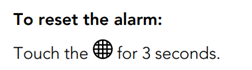
For Hobs with built in extractors
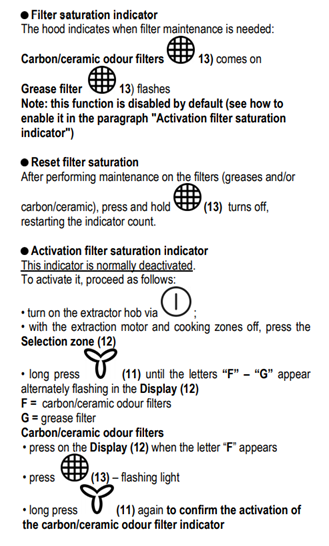
6. Contact an Authorised Service Center.
If the above suggestions did not solve the problem, we recommend requesting a visit by a service engineer.
Cause
- The reason that the cooker hood might indicate that one or more filters should be cleaned/replaced is that the expected service life of the filter has been reached and it must be cleaned or replaced.
- You can optimise the cooker hood’s performance by switching it on approx. 15 minutes before you start cooking. This way, suction will form in the room and the cooker hood will be more readily able to remove vapours and odours.
- You can avoid having to use higher fan speeds by switching the cooker hood on before you start cooking, thus also minimising noise from the cooker hood.
Was this article helpful?
Related Articles
- The Hob2Hood function does not work with the cooker hood
- Cooker hood stops during use
- The cooker hood is dripping water
- Why Is My Cooker Hood Noisy? Causes of Rattling, Whistling & Loud Noise
- Cooker Hood is clogged
- Cleaning the external surface of the cooker hood
- Cooker Hood Is Damaged, Dented or Scratched
- Hood button is stuck / broken
- Cooker Hood does not start
- Hood turns on by itself
Spare parts & Accessories
Find original spare parts and accessories for your appliance in our webshop and have them delivered directly to your door.
Related Articles
- The Hob2Hood function does not work with the cooker hood
- Cooker hood stops during use
- The cooker hood is dripping water
- Why Is My Cooker Hood Noisy? Causes of Rattling, Whistling & Loud Noise
- Cooker Hood is clogged
- Cleaning the external surface of the cooker hood
- Cooker Hood Is Damaged, Dented or Scratched
- Hood button is stuck / broken
- Cooker Hood does not start
- Hood turns on by itself