Hob displays message P
Issue
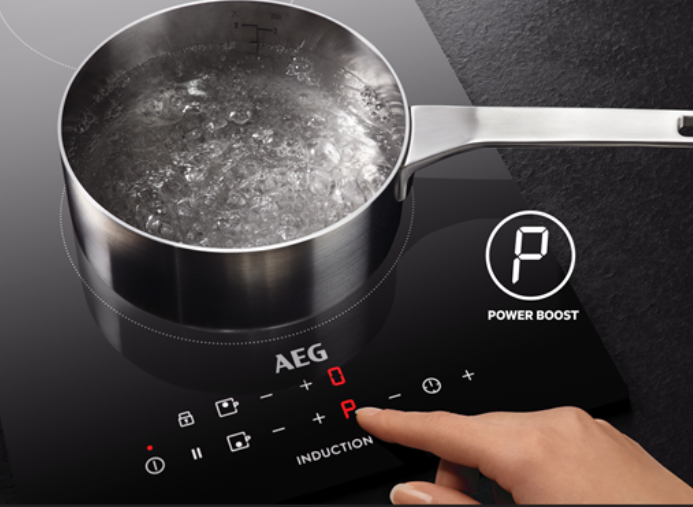
- Hob / cooker displays message P. It indicates that the Power Boost function is activated.
Applies to
- Induction Hob
- Freestanding cooker with Induction Hob
Resolution
The Power Boost function gives you an instant burst of heat, boiling water in under 90 seconds. It’s perfect for tasks like boiling a large pot of water quickly.
1. The P appearing on your induction hob refers to the Power Boost setting which allows you to activate or deactivate the maximum heat setting. When you choose P the maximum heat setting remains active for 10 minutes, after which the temperature returns to the previously set value.
2. To activate the Power Boost level, Tap and swipe or select the + (depending on your model) until you reach “P”.
For more information, refer to the user manual supplied with your appliance.
Was this article helpful?
Related Articles
- Hob displays message L, the hob is locked
- How to Find the PNC Number on an Installed Hob
- Discoloured glass plate / ceramic glass cleaning tips
- How do I connect my electric ceramic or induction cooker to the power supply?
- Induction hob displays error code F or F1
- The induction hob cannot be started after a short circuit
- Hob displays message F
- Hob Not Working: Cannot Activate, No Display, or Interface Not Responding
- Touch Control Induction or Ceramic hob beeps and then switches off
- What Cookware Works on Induction (Complete Guide)
Spare parts & Accessories
Find original spare parts and accessories for your appliance in our webshop and have them delivered directly to your door.
Related Articles
- Hob displays message L, the hob is locked
- How to Find the PNC Number on an Installed Hob
- Discoloured glass plate / ceramic glass cleaning tips
- How do I connect my electric ceramic or induction cooker to the power supply?
- Induction hob displays error code F or F1
- The induction hob cannot be started after a short circuit
- Hob displays message F
- Hob Not Working: Cannot Activate, No Display, or Interface Not Responding
- Touch Control Induction or Ceramic hob beeps and then switches off
- What Cookware Works on Induction (Complete Guide)