Washing Machine Not Working or Not Turning On – Troubleshooting Guide
Issue
Your washing machine is not working or does not respond. You may notice one or more of the following issues:
- No power to the washing machine
- Display is blank or does not light up
- Appliance does not react when pressing the ON/OFF button
- Washing programme fails to start
Applies to
- Washing machines
- Washer dryers
Resolution
How to Fix a Washing Machine That Won’t Turn On
If your washing machine is completely unresponsive, follow these steps to check the power supply:
1. Check the Electrical Connection
- Unplug the washing machine from the power outlet.
- Plug in another appliance (e.g. a hair dryer or lamp) to test the socket.
- Turn it on to confirm whether the outlet is working.
✅ If the test appliance works: the issue is likely with the washing machine.
❌ If the test appliance does not work: the problem is with the electrical socket or power supply.
2. Reset the Washing Machine
- Leave the washing machine unplugged for 15 minutes.
- Plug it back in and try turning it on again.
If the appliance still does not respond, contact Consumer Care/Service Support.
3. Electrical Issue?
If the socket is faulty or there are power supply problems:
- Contact a qualified electrician to inspect and repair the issue.
Washing Machine Turns On but Programme Won’t Start
If your appliance has power but won’t begin a wash cycle, check the following:
1. Check for Overloading
An overloaded drum can prevent the door from closing properly.
- Make sure the door is fully shut.
- Remove some laundry if necessary.
- Restart the programme.
The washing machine will not start if the door is not securely closed.
2. Child Lock May Be Activated
If you see a padlock symbol on the display:
- The Child Lock feature is enabled.
- This prevents accidental use during operation.
How to disable Child Lock:
- Press and hold the designated button(s) (marked with padlock symbol) for 3–5 seconds.
- Refer to your user manual if unsure which buttons to use.
Child Lock buttons example
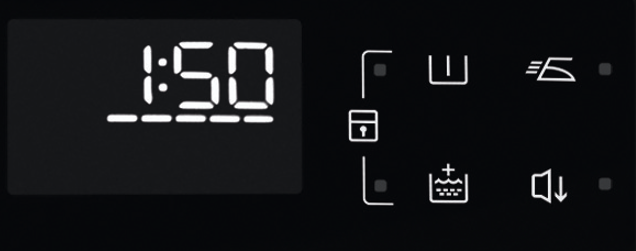
Once disabled, try starting the programme again.
3. Check for Error Codes
If your washing machine displays an error code (e.g. E10, E20):
- This indicates a specific issue (such as water supply problems).
- Refer to the appliance troubleshooting guide for the meaning of the code.
Resolving the indicated issue should allow the programme to start.
4. Book a Service Visit
If none of the above steps resolve the issue, we recommend booking a service visit with an authorised technician. A professional inspection will help identify and fix any internal faults safely and efficiently.
Need More Help?
- Consult your appliance user manual
- Visit our product-specific troubleshooting pages
- Contact our customer support if the issue persists
Quick Summary
If your washing machine won’t start:
- Check the power supply and socket
- Reset the appliance
- Ensure the door is fully closed
- Disable child lock if active
- Investigate any error codes
- Book a service visit if the issue persists
Taking these steps can quickly identify and resolve the most common washing machine issues.
Cause
FAQ – Washing Machine Will Not Turn On or Start a Programme
Why won't my washing machine turn on?
The washing machine may not be receiving power due to a faulty socket, power supply issue, or an internal electrical fault.
What should I do if my washing machine has no power?
Check whether the electrical socket is working by testing it with another appliance. If the socket works, reset the washing machine by disconnecting it from the power supply and reconnecting it after a short period.
Why does my washing machine turn on but not start a wash cycle?
This is often caused by the door not being fully closed, an overloaded drum, an active Child Lock, or an error code preventing the programme from starting.
How do I remove Child Lock on my washing machine?
Press and hold the button or buttons marked with the padlock symbol for 3 to 5 seconds. Refer to your user manual for model-specific instructions.
Can an error code stop the washing machine from starting?
Yes. Error codes such as E10 or E20 indicate a fault condition that may prevent the washing machine from starting until the issue is resolved.
When should I book a repair for my washing machine?
If the washing machine still does not turn on or start a programme after checking the power supply, door, Child Lock, and any error codes, there may be a fault that requires professional diagnosis and repair.
Was this article helpful?
Related Articles
- Using liquid detergent / What is the flap in my washing machine dispenser for?
- How to Drain a Washing Machine or Washer Dryer (Step-by-Step Guide)
- The door of the washing machine cannot be opened
- Washing machine displays error message EF0, EFo, EF3 or emits 15 beeps / 15 flashes
- Washing Machine Displays Error Code E90, E91, E92, E93 or E94
- Washing machine does not take detergents / water remains in the fabric softener compartment
- How to change the temperature in the ECO 40-60° program?
- The washing machine door does not close properly
- Washing machine stops in the middle of a cycle
- The "drum cleaning" icon appears on the washing machine display
Spare parts & Accessories
Find original spare parts and accessories for your appliance in our webshop and have them delivered directly to your door.
Related Articles
- Using liquid detergent / What is the flap in my washing machine dispenser for?
- How to Drain a Washing Machine or Washer Dryer (Step-by-Step Guide)
- The door of the washing machine cannot be opened
- Washing machine displays error message EF0, EFo, EF3 or emits 15 beeps / 15 flashes
- Washing Machine Displays Error Code E90, E91, E92, E93 or E94
- Washing machine does not take detergents / water remains in the fabric softener compartment
- How to change the temperature in the ECO 40-60° program?
- The washing machine door does not close properly
- Washing machine stops in the middle of a cycle
- The "drum cleaning" icon appears on the washing machine display