Hob displays message U or | |
Issue
- Hob/cooker displays message U or | | (pause). It indicates that the STOP+GO (keep warm) function is activated.
- Pause function on induction hobs - how it works?
Applies to
- ceramic hob
- induction hob
Resolution
1. To deactivate, touch on the STOP+GO or | | (pause) button.
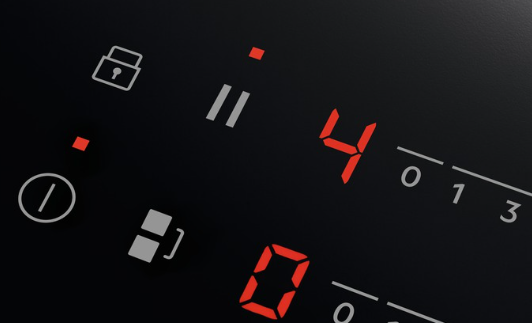
For more information, refer to the article: How to use hob "Stop and Go" or the "Pause" feature.
Download the user manual to learn more about your appliance functions.
Was this article helpful?
Related Articles
- What Cookware Works on Induction (Complete Guide)
- Induction hob displays error code F or F1
- Discoloured glass plate / ceramic glass cleaning tips
- Hob blows/ trips fuse
- Hob displays message L, the hob is locked
- Hob displays message A
- Touch Control Induction or Ceramic hob beeps and then switches off
- The drawer under induction hob gets very hot
- How to Find the PNC Number on an Installed Hob
- Hob displays error message E6 / E641
Related Articles
- What Cookware Works on Induction (Complete Guide)
- Induction hob displays error code F or F1
- Discoloured glass plate / ceramic glass cleaning tips
- Hob blows/ trips fuse
- Hob displays message L, the hob is locked
- Hob displays message A
- Touch Control Induction or Ceramic hob beeps and then switches off
- The drawer under induction hob gets very hot
- How to Find the PNC Number on an Installed Hob
- Hob displays error message E6 / E641