Tumble Dryer generates scraping/rubbing noise while drum rotating
Issue
- The Tumble Dryer generates scraping/rubbing noise while the drum rotating
- Rear drum locks have not been released correctly during the first use of the dryer
Applies to
- Heat pump dryers
Resolution
The rear drum locks are supposed to be removed automatically when the dryer is activated for the first time without the load in the drum. Please see the dedicated section in the user manual
However, if something goes wrong you can easily unblock the drum by yourself.
To do so, please follow the steps below:
1. Go to the back of the dryer
2. Find two rear drum locks - white plastic screw heads (hexagon socket) with indicators on them
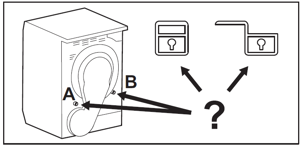
3. Find the “open padlock” pictogram located close to each of the drum locks
The pictograms are placed on the rear panel
4. Rotate the drum lock to have the indicator near the “open padlock” pictogram
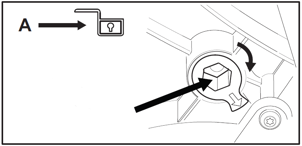
You can rotate the drum locks with a hex key (Allen key) size 12mm or use any other equipment you have at home that makes the screw heads (hexagon socket) possible to rotate
Was this article helpful?
Related Articles
- Tumble dryer’s water tank is empty
- Tumble dryer does not start / does not work
- Heat pump tumble dryer clothes do not seem hot enough and taking too long to finish (video)
- How to change the dryer door opening directions?
- Drying Temperature in Heat Pump Tumble Dryer
- Excessive moisture in room, on walls and windows where the tumble dryer is located
- Clothes are still wet at the end of the drying cycle
- Tumble dryer stops after a few minutes of the cycle
- Start - Pause LED flashes on tumble dryer
- Tumble dryer displays error message E60 and does not heat up
Related Articles
- Tumble dryer’s water tank is empty
- Tumble dryer does not start / does not work
- Heat pump tumble dryer clothes do not seem hot enough and taking too long to finish (video)
- How to change the dryer door opening directions?
- Drying Temperature in Heat Pump Tumble Dryer
- Excessive moisture in room, on walls and windows where the tumble dryer is located
- Clothes are still wet at the end of the drying cycle
- Tumble dryer stops after a few minutes of the cycle
- Start - Pause LED flashes on tumble dryer
- Tumble dryer displays error message E60 and does not heat up