Fridge freezer shows an alarm, red warning light, flashing triangle or beeps
Issue
- Alarm displayed on the fridge or freezer control panel
- Red warning light flashing
- Flashing triangle symbol on the display
- Appliance beeping or emitting an alarm sound
- Fridge or freezer not cooling sufficiently
- Temperature inside the appliance too high, inadequate cooling
Applies to
- Fridges
- Fridge freezers
Resolution
High-Temperature Alarm
A high-temperature alarm occurs when the temperature inside the fridge-freezer rises. This can happen after a power outage, frequent door opening, or if the door is not properly closed.
Symptoms:
- Flashing alarm indicator or triangle symbol
- Red warning light on the display
- Audible alarm (beeping sound)
How to switch off the alarm:
- Press any button to stop the sound
- The display will briefly show the highest temperature reached
- The display then returns to the set temperature
The alarm indicator continues flashing until the temperature returns to normal.
If no button is pressed, the sound stops automatically after around 1 hour.
Door Open Alarm
If the fridge or freezer door is left open:
- The alarm sounds after:
- Approx. 5 minutes (digital control models)
- Approx. 80 seconds (manual control models)
How to stop the alarm:
- Close the door to stop the alarm immediately
- Or press any button / alarm reset switch to mute the sound
The alarm sound will switch off automatically after around 1 hour if no action is taken.
Temperature Adjustment
Electronic Control Models
For appliances with electronic controls:
- Use the control panel to adjust the temperature settings
- Increase or decrease the temperature using the dedicated buttons or touch controls
- The selected temperature will be shown on the display
For recommended settings, refer to our guide on optimal temperature settings for fridges and freezers to ensure proper cooling performance.
Manual Control Models
- Turn the temperature regulator clockwise → colder temperature
- Turn the temperature regulator counterclockwise → warmer temperature
- The highest number on a rotary dial will be the coldest temperature in the fridge, 0 will turn off the fridge and 6-7 will be the coldest.
For best performance and food preservation, refer to our guide on optimal temperature settings for fridges and freezers to ensure your appliance is set correctly.
Temperature issues troubleshooting
Possible Cause | Solution |
The temperature is not set correctly | Set a higher/lower temperature. |
The door is not closed correctly. | Refer to the "Closing the door" section in your user manual |
The food products' temperature is too high. | Let the warm food product's temperature decrease to room temperature before storage. |
Many food products are stored at the same time. | Store fewer food products at the same time |
The thickness of the frost is greater than 3-5 mm. | Defrost the appliance |
The door has been opened too often. | Open the door only if necessary. Do not leave the door open for too long |
The Frostmatic / FastFreeze function is switched on | Refer to the "Frostmatic function" section in your user manual |
The Coolmatic / FastCool function is switched on | Refer to the "Coolmatic function" section in your user manual |
There is no cold air circulation in the appliance. | Make sure that there is cold air circulation in the appliance. Rearrange the goods. Refer to the "Hints and Tips" chapter in your user manual. |
Defrosting the fridge
The refrigerator compartment defrosts automatically during normal use.
- Defrost water drains into a container at the back of the appliance where it evaporates
- Regularly clean the drain hole to prevent water overflow. For this purpose, use the drain hole cleaner provided with the appliance (available also in our Webshop).
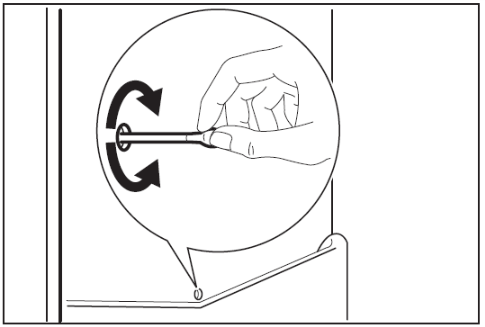
Defrosting the Freezer (Non NoFrost Models)
Frost can build up over time and should be removed regularly.
When to defrost:
- When frost reaches 3–5 mm thickness
Steps:
- Switch off and unplug the appliance
- Remove and store food in a cool place
- Leave the door open
- Place a cloth or container to collect water
- Use a container of warm water to speed up defrosting
- Dry the interior thoroughly
- Restart the appliance and set to maximum cooling for 2–3 hours
- Return food once the temperature stabilises
Important:
- Do not use sharp or metal tools to remove ice
- Do not use unapproved devices to speed up defrosting
- Avoid touching frozen food with wet hands
Frost-Free (NoFrost) Models
- No manual defrosting required
- Frost does not build up during operation
Summary
Alarms, flashing symbols, and beeping sounds in your fridge freezer usually indicate temperature changes or a door left open. Identifying the cause and following the correct steps will help restore normal operation and maintain proper cooling performance.
See our helpful video guides
Top troubleshooting issues you may come across on your new Fridge Freezer
Still need help? Get expert support
If the issue continues, a professional technician can help diagnose and fix the problem.
No matter if your appliance is in warranty, out of warranty, or covered by an appliance protection plan - we’ll guide you to the right service.
Was this article helpful?
Related Articles
- Temperature in the fridge-freezer is too low
- What is the optimal temperature in the fridge / freezer?
- Strange noises from Fridge Freezer
- The light does not work in my fridge-freezer
- My fridge freezer is not working
- Moisture in the vegetable drawer or under the glass shelf in the fridge
- Water Leaking from Fridge or Fridge Freezer – Causes & Solutions
- Food freezing In fridge
- Why Is My Fridge Compressor Running Continuously?
- The front corners and sides of my refrigerator / fridge freezer are warm
Spare parts & Accessories
Find original spare parts and accessories for your appliance in our webshop and have them delivered directly to your door.
Related Articles
- Temperature in the fridge-freezer is too low
- What is the optimal temperature in the fridge / freezer?
- Strange noises from Fridge Freezer
- The light does not work in my fridge-freezer
- My fridge freezer is not working
- Moisture in the vegetable drawer or under the glass shelf in the fridge
- Water Leaking from Fridge or Fridge Freezer – Causes & Solutions
- Food freezing In fridge
- Why Is My Fridge Compressor Running Continuously?
- The front corners and sides of my refrigerator / fridge freezer are warm